
Get started
Set up your WordPress competition website.
Install raffleWP, start from optional page layouts or a competition preset, estimate your costs and use the Launch checklist to prepare your first competition.
Build your competition website in four clear steps.
01
Choose your licence
Pick Single Site or Unlimited Sites.
02
Install raffleWP
Install the plugin on your WordPress site.
03
Create your competition
Start from a fresh competition or saved preset, then add your prize details, costs and entry settings.
04
Launch
Complete the Launch checklist, confirm your test purchase and emails, then publish and prepare your promotional artwork.
Before you start
- A WordPress site with WooCommerce installed and its store pages configured
- Your competition details
- Your prize information
- The rules and settings you intend to use
What raffleWP handles
- Competition setup and configuration
- Entry management from WordPress
- Instant wins and winner selection
- Blocks and shortcodes for competition pages
- Admin tools for day-to-day operations
BUILT WITH YOU, BY RAFFLEWP
Website builds from £2,500
Want a hand with the whole build? We can tailor the design, configure your competitions and guide you through launch.
No VAT charged. Explore website design →
Common questions
Does raffleWP include starter pages and launch tools?
Yes. Preview Clean and Bold Home, How to Enter and Winners and Results layouts, then create selected pages as drafts. Existing pages and global styles stay in place. The Launch checklist brings setup checks, actual-page previews, sample emails and an owner-confirmed test purchase into the dashboard.
Will I need to know how to code to use raffleWP?
You do not need to write code to create raffles, configure entries, manage winners or use the standard raffleWP blocks and single-product layout. The Design, Labels and Product Page settings let you control colours, fonts, spacing, wording, section visibility and other presentation options. Individual blocks also include their own layout and styling controls.
raffleWP is a plugin rather than a complete WordPress theme. It supplies the raffle functionality and page components, then inherits styling from your active theme. The built-in controls should be enough for many websites, but some themes may need additional CSS refinements. More bespoke templates, layouts or functionality may require CSS, PHP or broader WordPress development experience.
If you need a custom layout, integration or other bespoke code, review the raffleWP documentation or contact raffleWP through the Support page to discuss your requirements.
How do I install raffleWP?
After purchase, install WooCommerce, upload and activate raffleWP on your WordPress site, then activate your licence. Download and install any included addons you want separately.
Can I use it on more than one site?
Single Site covers one website. Unlimited Sites covers as many websites as you need.
Which licence should I choose?
Choose Single Site for one competition website. Choose Unlimited Sites if you manage multiple sites or build for clients. Both licences are valid for 12 months and renew only when you manually purchase a new key.
What happens when my licence expires?
The plugin shows an administrator reminder during the final 30 days. After expiry, an already activated website and its live raffles continue to operate, but official updates, downloads, new activations and raffle configuration settings are unavailable until you purchase and activate a new annual licence. Renewal is manual and there is no automatic charge.
Where do I get support?
Start with the documentation, or contact support from the Support page.
Prepare the parts that matter before launch
In raffleWP’s Starter kits screen, preview an optional Clean or Bold layout and create an editable draft. You still choose when to publish the page and how it fits into your homepage and navigation.
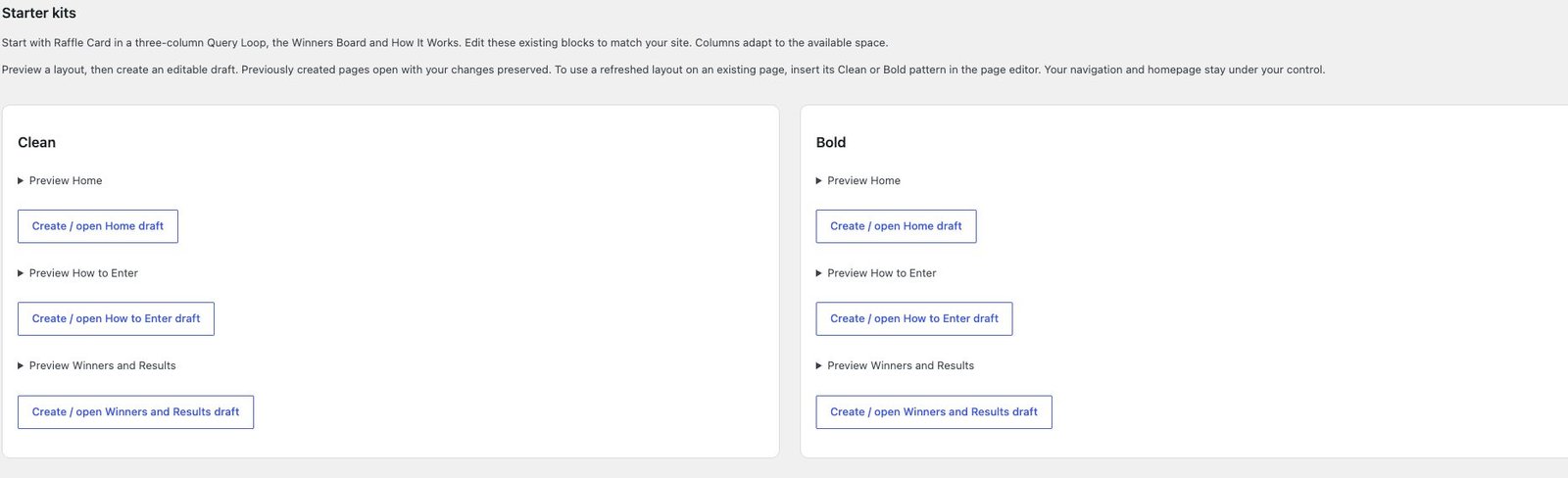
Pages and presentation
Preview Clean or Bold layouts, create the drafts you want and adjust blocks, colours and labels for your brand. Your existing pages remain under your control.
Entries and prize promises
Test chosen numbers or Lucky Dip, bundles, closing dates and postal processing. Configure any main-prize cash alternative before entries begin.
Costs, claims and results
Use the cost planner, then test payment, emails and the winner claim journey. Main draws and cash payments require organiser action.