
Features
WordPress competition website builder tools
Build a competition website with native WordPress editing and raffleWP’s WooCommerce competition blocks. Start with optional Clean or Bold layouts, customise your colours and labels, and reuse competition settings without copying old entries or winners.

What you can do
Choose a useful starting point
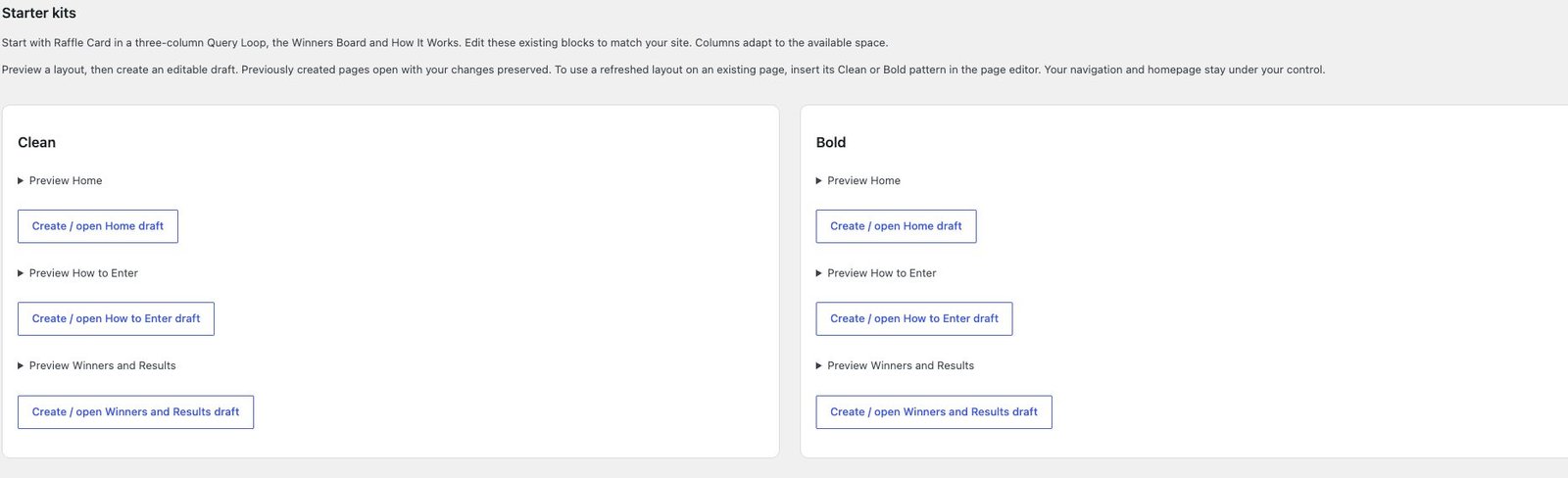
Preview Clean and Bold layouts for Home, How to Enter, and Winners and Results. Create only the draft pages you want, then publish and assign them through WordPress.
Control the presentation
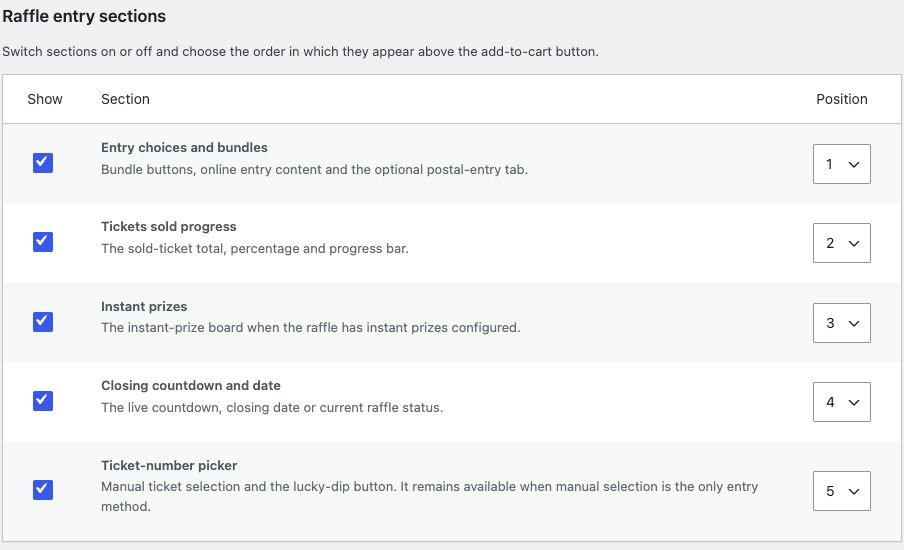
Use competition cards, entry panels, prize boards, winners and account blocks. Adjust plugin colours, typography and labels, and choose which supported product sections appear.
Reuse setup safely
Save reusable competition presets or duplicate a competition into a fresh draft. Reuse allowed configuration while clearing dates, ticket history, awards and other operational records.
A practical build workflow
- Install WordPress, WooCommerce and raffleWP with a suitable theme. Configure the store pages and a payment method approved for your business model.
- Preview a starter layout and create the pages you need. Edit the native blocks, replace introductory copy with your own terms and explanations, then choose your homepage and menus in WordPress.
- Build the competition product with real prize images, a clear entry route, dates and limits. Use raffleWP blocks to surface the current competition data rather than copying availability into static page text.
- Set the plugin’s design options and customer-facing labels. Check competition pages, checkout and My Account together so colours and terminology stay consistent.
- Run the launch checklist, inspect the actual page at mobile, tablet and desktop widths, complete a test purchase and check the real emails. Publish only after reviewing those results.
Customise the site without recreating every competition
Native Gutenberg blocks can be arranged inside your WordPress layouts. Shortcodes provide another route for supported components when a page layout or editor needs them. Product-section controls let you adjust supported competition content without rebuilding the underlying entry process.
Clean and Bold starter pages are optional drafts. Installing the plugin does not replace your homepage, menus, existing pages or global styles. You decide which layouts to create, edit and publish.
Presets copy the allowed content and configuration, including prize images, entry choices, bundles and planning inputs. New copies reset sales and ticket availability, clear dates and leave behind entries, winners, claims and campaign links. Check the new prize and dates before publishing.
raffleWP is a plugin, so your theme still controls the wider site. Advanced layouts or third-party theme differences may need CSS or development work. For a complete build, explore our competition website design service and the existing customer showcase.
Common questions
Do I have to use the starter layouts?
No. You can create your own pages with the native blocks or use supported shortcodes. The starter pages are optional, editable starting points.
Will installing raffleWP overwrite my homepage?
No. Starter pages are created only when you choose them. Publishing pages and assigning the homepage remain normal WordPress actions.
Does the launch checklist guarantee the site is ready?
It highlights configuration and maintenance checks, but you still need to complete the real payment and inbox tests and review your terms, content and customer journey.
BUILT WITH YOU, BY RAFFLEWP
Website builds from £2,500
Like the flexibility of these tools, but want help bringing the site together? Let the raffleWP team handle your build.
No VAT charged. Explore website design →
Build the rest of your workflow
Plan the entry experience, check your competition costs, and follow the full WordPress competition website guide.
This feature is included with every current raffleWP licence. WordPress and WooCommerce are required. Optional addons are separate plugin downloads included with your licence.
Product information reviewed on 8 September 2026 against raffleWP 1.4.2 and the relevant addon documentation. Published by raffleWP.
Try raffleWP for yourself
Explore a competition website, try the ticket controls and take a read-only tour of the admin area.
Fictional prizes and entries. No payments or registration.