
To build a competition website with WordPress, combine a well-maintained WordPress installation, WooCommerce for products and orders, and a specialist competition plugin for entries, ticket numbers, instant wins and winner records. Define the promotion first, then configure the technology around its entry and fulfilment rules.
This step-by-step UK guide covers the website, operational and trust decisions that should be made before launch. It is a practical starting point, not legal, payment or financial advice.
What does a WordPress competition website need?
| Layer | What it does | Typical choice |
|---|---|---|
| Website | Pages, content, design and user accounts | WordPress and a suitable theme |
| Commerce | Products, basket, checkout, orders and payment-gateway connections | WooCommerce |
| Competition workflow | Entry allocation, limits, instant wins, free entries and winner records | A specialist WordPress competition plugin |
| Operations | Email delivery, backups, security, analytics and support | Reliable hosting and carefully selected services |
| Governance | Terms, eligibility, entry routes, advertising and evidence | Your documented process and professional advice where needed |
The important word is connected. A polished landing page is not enough if paid orders, valid entries, refunds and winners are held in unrelated systems that your team cannot reconcile.
Step 1: define the competition model
Before installing plugins, document exactly what customers will be entering. Decide:
- Whether entry is paid, free, skill-based, judged or determined by chance.
- Which countries and age groups are eligible.
- Whether there will be a free entry route.
- How many entries are available and whether customers may choose numbers.
- Whether entry limits apply per person, household or order.
- What happens if the competition does not sell out.
- How and when the winner will be chosen and contacted.
- Whether instant-win prizes form part of the promotion.
In Great Britain, the legal distinction between a lottery, free draw and prize competition matters. Read the Gambling Commission guidance and obtain professional advice if you are unsure. Do not assume that adding a simple question or postal address automatically makes every business model compliant.
Step 2: choose hosting and secure WordPress
A competition launch can create sharp traffic and checkout spikes. Choose hosting based on the likely concurrent traffic, orders and background processes rather than the average number of daily visitors.
- Use HTTPS throughout the site.
- Keep WordPress, the theme and plugins supported and updated.
- Use strong administrator accounts with two-factor authentication.
- Configure automated off-site backups and test restoration.
- Protect login, checkout and account pages without blocking legitimate customers.
- Use a staging site for updates and launch testing.
- Monitor uptime, PHP errors, failed scheduled tasks and email delivery.
Avoid caching basket, checkout, customer-account and other personalised competition states as static public pages. Ask your host or developer to review the caching rules before launch.
Step 3: configure WooCommerce
WooCommerce provides the commercial foundation: products, prices, baskets, checkout, customer accounts, orders, taxes where applicable and payment integrations. Configure the store details, currency, transactional emails, privacy settings and order behaviour before adding competition-specific rules.
Place a test order through every status your payment flow may produce. Note when an order changes from pending to processing or completed, how failed payments behave and how a refund is recorded. Your competition plugin should award or invalidate entries in a way that matches these states.
Step 4: choose the competition plugin
Compare plugins against your written workflow. A paid competition site normally needs more than a giveaway form.
- Competition dates, capacity and availability.
- Reliable entry reservation and allocation.
- Randomly assigned or customer-selected ticket numbers.
- Per-customer and per-order limits.
- WooCommerce order-status and refund handling.
- Instant-win prize mapping and fulfilment.
- Free-entry administration where required.
- Customer account and order displays.
- Entry export, winner selection and redraw records.
- Blocks or templates that work with your theme.
See our WordPress competition plugin features or the companion guide to choosing between WordPress competition plugins.
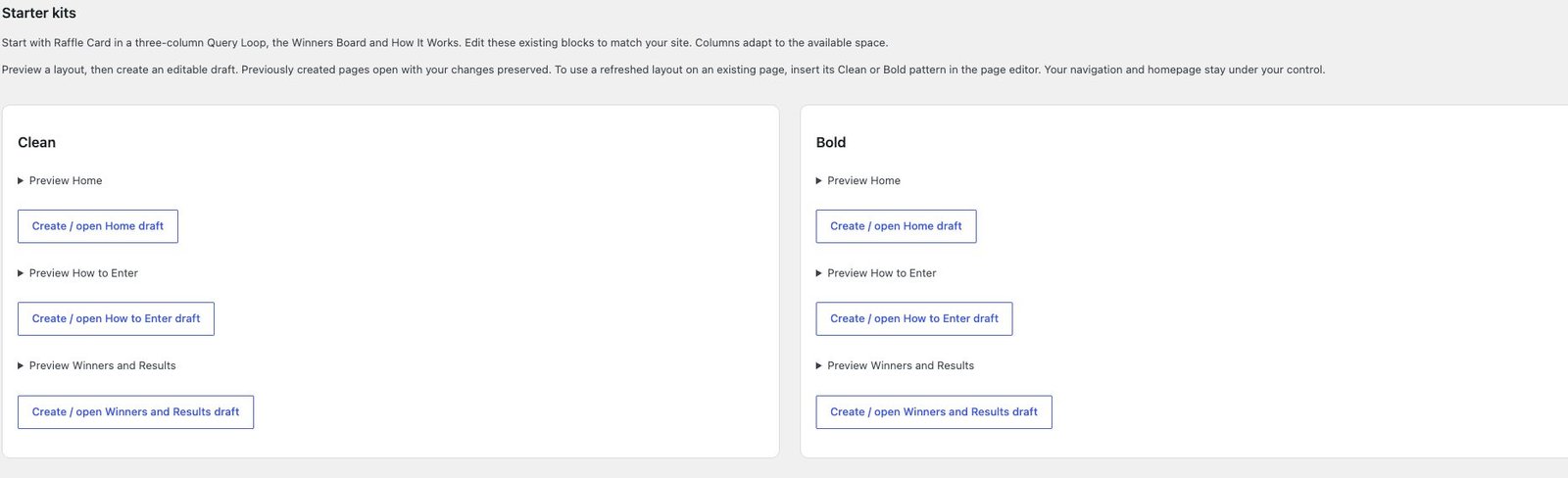
Step 5: build the essential pages
A credible competition website should make it easy to understand the business, promotion and customer journey. Prepare these pages before advertising:
- Homepage: explain what the site offers and show current competitions.
- Competition page: prize, price, closing date, capacity, entry method, significant conditions and call to action.
- How it works: a plain-English journey from entry to winner.
- Winners: appropriate winner information and evidence without unnecessary personal data.
- Terms and conditions: both site terms and promotion-specific rules.
- Free entry: clear instructions and equal prominence where the model requires a free route.
- Contact and support: real business details and an accessible route for questions or complaints.
- Privacy and cookies: explain data processing and consent choices.
- Account pages: orders, entries, wins and any site credit.
Step 6: design the competition product page
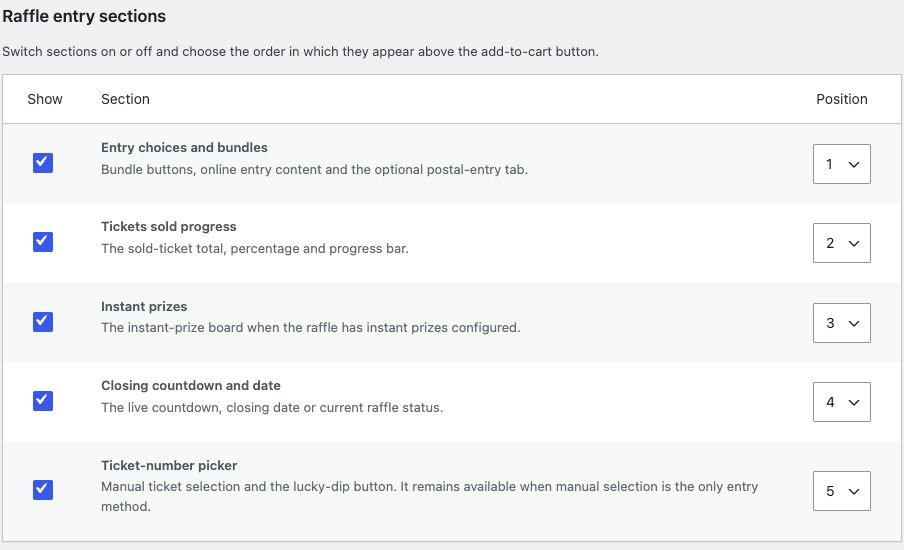
The product page should answer the customer’s key questions before asking for payment: what can I win, what does entry cost, when does it close, what are my chances, what happens next and who is running it?
- Use original, accurate prize imagery.
- Put the price and closing information near the entry control.
- Explain whether numbers are chosen or assigned.
- Show entry limits before checkout.
- Link significant terms where customers will see them.
- Make sold-out, closed and cancelled states unambiguous.
- Test keyboard, screen-reader and mobile use.
- Avoid countdowns or urgency claims that do not reflect the real closing policy.
Step 7: confirm payment-provider acceptance
Do not assume that a gateway supporting ordinary WooCommerce stores will accept prize competitions. Explain the exact business model during underwriting, including territories, prize types, paid and free entry routes, refund policy and expected volumes. Obtain acceptance from the provider rather than relying on an unrelated website’s experience.
Keep an alternative operational plan for gateway reviews, delayed settlements and disputes. Make sure the checkout wording, merchant name and customer-support details are consistent with the information given to the provider.
Step 8: document free entries and significant terms
If your promotion relies on a free entry route, build it into the normal entry process rather than treating it as an afterthought. The Gambling Commission says a compliant free route must be no more expensive and no less convenient than the paid route, and must be promoted at the same level.
Define how requests are received, validated, entered before the close and evidenced. Valid free entries must receive the appropriate chance of winning. Our guide to free postal entry routes covers the operational detail.
Review the CAP Code rules for promotional marketing when writing advertising and terms. Include closing dates, eligibility, entry methods, restrictions, prize details, winner selection and any circumstances in which the promotion may change.
Step 9: prepare the draw and fulfilment process
Before launch, decide who closes the competition, reconciles payments and refunds, processes final free entries, freezes the eligible pool and conducts the draw. Record the method, result, reserves and any redraw reason.
A public animation can make a reveal engaging, but it is not a substitute for evidence. Read how to prepare for verifiable random winner selection.
Step 10: test the complete customer journey
| Test | What to verify |
|---|---|
| Successful payment | Correct entry count, numbers, emails, order display and availability |
| Failed or abandoned payment | No valid entry remains and reserved capacity is released correctly |
| Refund | Entry eligibility and audit record match the published policy |
| Final tickets | Concurrent customers cannot receive duplicate or excess entries |
| Entry limit | Limits work across basket changes, accounts and repeat orders |
| Free entry | Valid request can be recorded, found and included consistently |
| Instant win | Reveal, notification, record and fulfilment all agree |
| Draw export | Eligible and excluded entries can be explained |
| Mobile and accessibility | Selection, checkout, account and terms work without a mouse |
Run these tests on staging, then perform a small controlled live transaction after deployment. Confirm transactional email delivery and analytics without exposing customer information.
Frequently asked questions
Can WordPress run a competition website?
Yes. WordPress can provide the site and content, WooCommerce can manage products and orders, and a specialist plugin can connect entries, ticket numbers, instant wins and winners to that workflow.
Do I need to know how to code?
Many standard sites can be configured without custom code. You still need enough WordPress and WooCommerce knowledge to maintain the site, test updates and diagnose operational problems. Bespoke designs or integrations may require a developer.
How much does a WordPress competition website cost?
The budget normally includes hosting, a domain, theme or design work, the competition plugin, payment fees, email delivery, security, legal advice, marketing and ongoing support. Compare the total annual operating cost rather than the plugin price alone.
Should I launch with several competitions?
A controlled initial launch with a manageable number of products is easier to test and support. Prove that entries, payments, emails, refunds and draws reconcile correctly before increasing complexity and traffic.
Your next step
Turn this guide into a written launch plan with an owner and evidence for every step. If you want to keep the competition workflow inside WordPress and WooCommerce, follow the raffleWP setup overview and explore the documentation.
BUILT WITH YOU, BY RAFFLEWP
Website builds from £2,500
Prefer to hand over the website build? We can handle the design, setup and technical launch, then show you how to manage it.
No VAT charged. Explore website design →
Planning your budget? Read our competition website cost guide for build costs, first-year inclusions and ongoing expenses.
Explore the tools behind the build
See native blocks, starter layouts, presets and design controls for the product capabilities used in this guide. Compare options in the WordPress competition plugin comparison and check how orders become tickets before launch.