
Features
Competition promotion tools for WordPress
raffleWP helps you prepare competition promotion from the prize and winner records already in WordPress. Create branded artwork, save campaign links and review attributed paid orders and refund-adjusted revenue without rebuilding the details in separate documents.
What you can do
Launch and closing-soon artwork
Choose a launch or closing-soon layout, edit the headline and copy, then export square, portrait or story PNG graphics using your competition details.
Approved winner graphics
Prepare winner artwork from reviewed results. Winner stories and photographs require the recorded publication permissions and approval that apply to the original record.
Named campaign links
Save links with a source, medium and stable campaign identifier. Compare orders and revenue attributed through WooCommerce’s order-attribution data.
Example: promote a competition through its lifecycle
- Open Promote from the competition product or dashboard. Choose a launch layout and check the prize, image, headline and entry link.
- Preview the graphic as a square, portrait or story. Export a 1080 × 1080, 1080 × 1350 or 1080 × 1920 PNG for your chosen channel. The artwork is generated in the browser.
- Create a named campaign link for that placement, such as an organic social launch post. Use the saved link when you publish the artwork and explanatory copy yourself.
- Before entries close, prepare a closing-soon graphic and check the actual deadline. After the draw, review and approve the result before preparing winner artwork.
- Review attributed paid orders, net entries and revenue excluding tax. Account for refunds before comparing the recorded performance of campaigns.
Understand what the campaign report can tell you
raffleWP reads WooCommerce order-attribution metadata. It does not introduce tracking cookies or bypass consent. If attribution is disabled or the order has no usable campaign information, that missing information cannot be reconstructed by the report.
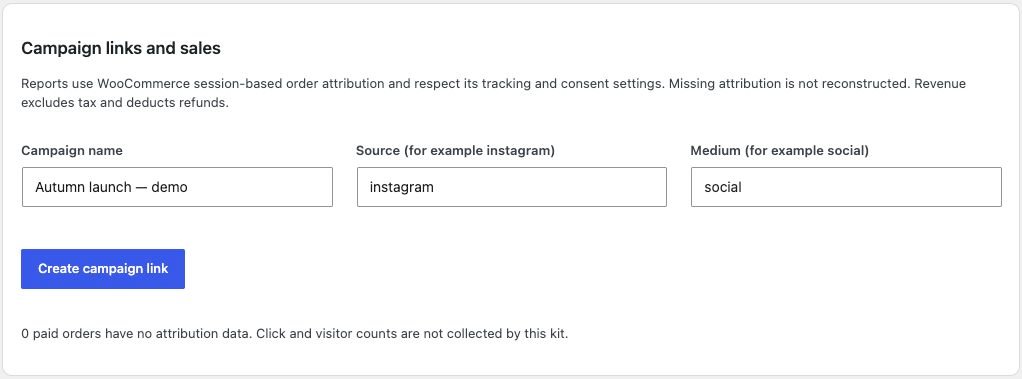
This is an order report, not visitor or click analytics. A saved campaign link does not guarantee attribution across every device, browser or visit. Treat recorded orders as attributed activity rather than proof that a campaign caused the sale.
Exporting artwork does not post it to social networks, send marketing emails or schedule a campaign. Review and publish the material through your chosen channel. If a winner withdraws permission, remove any already shared material you control as well as updating the source record.
For onsite promotion, the included Popup Maker, Prize Draw Reminders and Daily Spin addons provide separate optional tools. Use each within its documented settings and your customer permissions.
Common questions
Can I use the tools for organic promotion?
Yes. You can export artwork and use campaign links in unpaid posts, videos or other placements. There is no requirement to buy advertising.
Does raffleWP publish or schedule my social posts?
No. It prepares the artwork and campaign links. You review, publish and schedule through your own chosen channels.
Does the report show every visitor and click?
No. It reports recorded order attribution, including paid orders and refund-adjusted revenue. Use an appropriate analytics tool if you need visitor and click measurements.
Build the rest of your workflow
Prepare approved winner results, review competition economics, and explore all four included addons.
This feature is included with every current raffleWP licence. WordPress and WooCommerce are required. Optional addons are separate plugin downloads included with your licence.
Product information reviewed on 8 September 2026 against raffleWP 1.4.2 and the relevant addon documentation. Published by raffleWP.